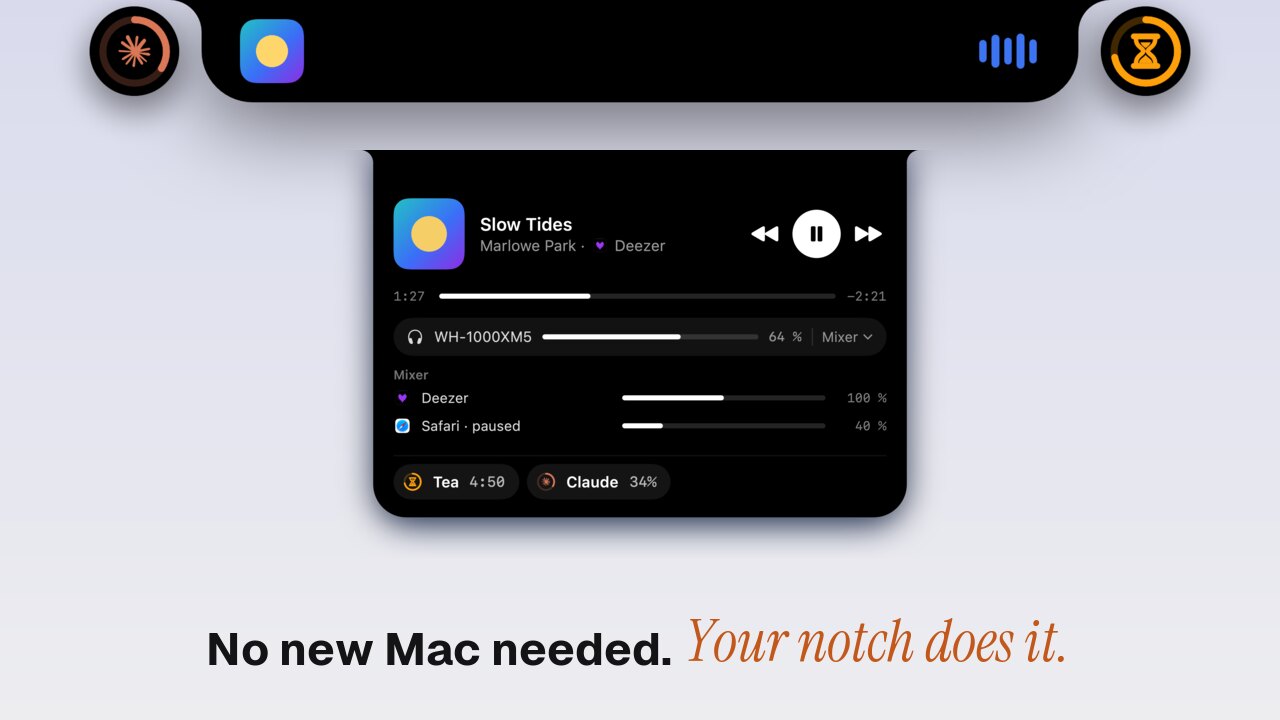
On 28 October 2026 Apple announced the OLED MacBook Pro, the first Mac with a Dynamic Island. It starts at $2,899 for the 14-inch model and $3,399 for the 16-inch, $400 more than the same size and chip without OLED. If what you want is the island itself (your music, a call, an AirDrop and what's running, around the camera), you don't need to buy that Mac. Toolnotch 2 puts a live island around the notch of the Mac you already have, and draws a virtual one on a Mac without a notch. It costs $19.99 at most, paid once, for three Macs.
I make Toolnotch, so read the comparison with that in mind. Apple's facts below come from Apple's announcement as reported by MacRumors and Engadget, checked on 12 November 2026.
What Apple's Dynamic Island does on the Mac
The island replaces the notch on the new 14-inch and 16-inch OLED MacBook Pro. Apple describes it as an interactive area that brings Live Activities, Spotlight and Siri together. From the announcement:
- Ongoing activities stay visible while you work in other apps.
- You can answer a phone call, control the music and accept an AirDrop from it.
- On the touchscreen, a tap on the island pauses a song.
- Spotlight and Siri open there.
It doesn't bring Face ID: the new MacBook Pro keeps Touch ID.
What it costs
| Price | What you get | |
|---|---|---|
| OLED MacBook Pro 14-inch | from $2,899 | M5 Pro or M5 Max, OLED touchscreen, Dynamic Island |
| OLED MacBook Pro 16-inch | from $3,399 | Same, larger |
| Toolnotch 2 | $19.99 at most, once (pricing) | A live island on the Mac you have, plus clipboard history, window manager, breaks and keep-awake |
If your Mac is getting old and you wanted a new one anyway, the OLED MacBook Pro is a very good machine and the island is a nice bonus. If your Mac is fine and the island is what tempts you, $2,899 is a lot to pay for a strip of pixels around a camera.
Will other Macs get it from Apple?
Part of it. The first beta of macOS 27.3, out on 3 November, shows Live Activities as small pills in the menu bar: Music, Clock, Voice Memos and screen recording for now, and apps can add their own. MacRumors and AppleInsider report them on Macs without the island too, and 27.3 is expected in December. Those pills live in the menu bar. Apple hasn't announced the island itself, its calls or its Spotlight for any other Mac.
So if you run macOS 27 on Apple silicon and only want to see your music and a timer, wait for 27.3: the pills may be enough. If you're on macOS 15 Sequoia or macOS 26, or want the notch to do things for you, read on.
What Toolnotch's live island does
Toolnotch is a set of tools that live in the notch. Version 2 adds what Apple calls Live Activities and Toolnotch calls the live island: whatever runs on your Mac shows on the notch's shoulders, left and right of the camera. Rest the pointer on it and its card opens; move away and it folds back.
The difference with Apple's: most of Toolnotch's island lets you act, not only look. Allow an AI agent's command, mute a call, join a meeting, reply to a message, send a file, all from the notch. What can live there, each with its own switch:
- Claude Code and Codex. An agent at work shows like the music: « working · 12 min », then « finished ». When it asks for permission or asks a question, you answer from the notch. AI agents in the notch.
- Calls. While Zoom, Teams, FaceTime, Slack, Discord, WhatsApp, Telegram or a browser call uses the microphone, the island shows how long you've been on. On Zoom, Teams and Google Meet it also has mute, camera and leave, and ⌃⌥M mutes from anywhere. Calls and meetings in the notch.
- Your next meeting. From your macOS Calendar, 15 minutes before it starts, with « Join » for Meet, Zoom, Teams and FaceTime links.
- Messages. Off by default. Messages, WhatsApp, Telegram, Discord, Mail and Slack notifications can show in the notch, and you can reply to iMessage and WhatsApp without leaving what you're doing.
- Files. Drop a file on the notch to keep it at hand, compress it, strip its metadata, make it web-ready or AirDrop it.
- Music. The song, artwork, play and pause, previous and next, a scrub bar, the output and its volume. It works with any app that plays media, and recognises Apple Music, Spotify, Deezer, Tidal, Qobuz, Amazon Music, YouTube Music and Pocket Casts as music apps. When two players run, « Switch to » moves to the other one. More on music in the notch.
- AirPods and headphones. Connected, disconnected and their batteries, with a warning when an earbud drops to 10 %.
- Your Mac's battery. Plugged in, then 20 % and 10 % left.
- Downloads. Safari's and Chromium browsers' downloads (Chrome, Arc, Brave, Edge) with their progress, and new files landing in your Downloads folder.
- Toolnotch's own tools. A timer, the next eye break, a keep-awake session, the files you dropped on the notch.
Volume, brightness and the keyboard light can also show in the notch instead of macOS's own HUD (off by default).
More than an island
The island is the newest part of Toolnotch. The rest is a set of tools that open from the notch, and Apple's island doesn't do any of it:
- Pasteback, a clipboard history: ⇧⌘C brings back anything you copied, and you can copy text from anything on screen.
- Wyndow, a window manager: snap windows from the keyboard and get them back in place after you unplug a display.
- Bodybreak, eye and body breaks on the 20-20-20 rule.
- Staywake, which keeps the Mac awake for a while or until a terminal job ends.
Apple's island and Toolnotch's, side by side
| OLED MacBook Pro | Toolnotch 2 | |
|---|---|---|
| Price | from $2,899 (the whole Mac) | $19.99 at most, once |
| Macs | the new OLED MacBook Pro only | macOS 15 Sequoia or later, notch or not |
| Music | Yes | Yes |
| Answer a phone call | Yes (iPhone calls) | No |
| Video calls: time, mute, camera, leave | Not announced | Yes (Zoom, Teams, Meet) |
| AirDrop | Accept a request | Drop a file on the notch to AirDrop it |
| Next meeting with « Join » | Not announced | Yes |
| AirPods batteries | Not announced | Yes |
| Claude Code and Codex | No | Yes |
| Spotlight and Siri in the island | Yes | No (the hub has its own search) |
| Touch | Yes, it's a touchscreen | No, pointer and keyboard |
Limits worth knowing
- No iPhone calls, no Siri. Toolnotch doesn't relay your iPhone's phone calls, and Siri and Spotlight stay where macOS puts them.
- Without a notch, only while the menu bar shows. On a Mac without a notch, the island is a black virtual notch at the top centre. It isn't drawn in full screen or with a menu bar that hides itself. ⌃⌥N opens the hub from anywhere.
- Some sources need a permission. Batteries need Bluetooth, call buttons and media keys need Accessibility, messages need Accessibility or Full Disk Access. Nothing is asked at launch: Toolnotch explains each one when you turn the source on, and every source works without the others.
- Tested macOS versions. Some sources read parts of macOS that Apple doesn't document. They're switched on only on the versions Toolnotch was tested on (15, 26 and 27); on any other version, messages turn off and music falls back to Apple Music and Spotify.
Setting it up
- Download Toolnotch from toolnotch.app and open it. It runs on macOS 15 Sequoia or later, Apple silicon and Intel.
- Play a song. It appears around the notch.
- In Settings › General › Daily Mac, turn the sources you want on or off. The Live Island settings choose, per tool, between the island, a small bubble or nothing.
If you already have a Toolnotch licence, version 2 is included.
FAQ
Which Mac has a Dynamic Island?
Only the OLED MacBook Pro announced on 28 October 2026, in 14-inch (from $2,899) and 16-inch (from $3,399) versions. Earlier MacBook Pros keep the notch, and Apple hasn't announced the island for any other Mac.
Can I get a Dynamic Island on my current MacBook?
Not Apple's. An app can draw one around the notch you have: Toolnotch 2 shows your music, calls, meetings, AirPods, downloads and AI agents there, and draws a virtual notch on Macs without one.
Will macOS 27.3 add the Dynamic Island to older Macs?
The 27.3 beta adds Live Activities as pills in the menu bar, and reports from the beta show them on every Mac that runs it. They are not the island itself. macOS 27.3 is expected in December 2026.
Does Toolnotch work on an iMac or a Mac mini?
Yes. Without a notch, the island hangs from the middle of the menu bar on the screen you're working on.
Sources
- MacRumors, « Apple Announces OLED MacBook Pro With Touch Display », 28 October 2026: prices, release on 6 November.
- MacRumors, « Apple Brings Dynamic Island to Mac for the First Time », 28 October 2026: what the island does.
- Engadget, on the redesigned MacBook Pro, 28 October 2026: prices, Dynamic Island around the webcam.
- Consomac, on macOS 27.3 beta 1, 4 November 2026: Live Activities pills in the menu bar.
- MacRumors and AppleInsider, 4 November 2026: macOS 27.3 brings Live Activities to Macs without the Dynamic Island.