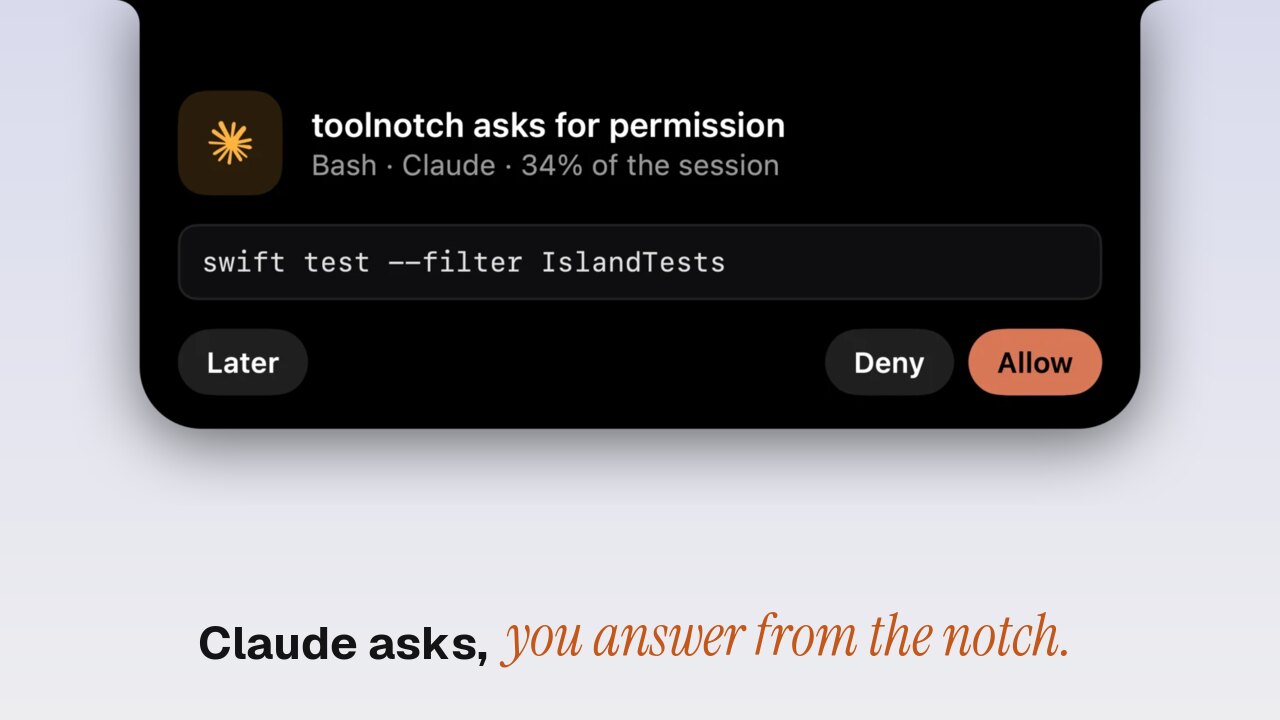
An AI coding agent spends most of its time working on its own, then stops to ask « may I run this? » while you're in another window. The free fix is a hook that posts a macOS notification when the agent needs you. Toolnotch 2 goes one step further: the agent shows in the MacBook notch while it works, and when it asks for permission or asks a question, you answer in the notch without going back to the terminal.
Option 1: a hook and a macOS notification
Both agents can run a command of yours at key moments.
Claude Code has hooks, set in ~/.claude/settings.json or with the /hooks command. A Notification hook runs when Claude needs your attention, such as a permission request. Point it at osascript to get a regular macOS notification:
osascript -e 'display notification "Claude Code needs you" with title "Claude Code"'
Codex has a notify setting in ~/.codex/config.toml that runs a program when a turn ends, and hooks in recent versions.
It's free and takes five minutes. Where it stops: the notification tells you to go back, it doesn't let you answer. You still switch to the terminal, find the right tab and type your answer, and banners pile up in Notification Center when several agents run.
Option 2: the agent in the notch
Toolnotch's live island shows what runs on your Mac around the notch: the music, a call, a download. Claude Code and Codex show there the same way.
- While it works: « working · 12 min » on the notch's shoulder.
- When it asks for permission: « asks for permission », and the card opens with the command and « Allow », « Deny » or « Show ».
- When it asks a question: « asks a question », with its choices. Pick one, or several then « Send ».
- When it's done: « finished ».
- Your limits: « Claude · 72 % of the session », if you use the AI limits tool.
Not ready to answer? « Later » folds the card and leaves the request waiting in the terminal. « Answer in the terminal » does the same on purpose.
Long commands
A long command doesn't hide behind one line. « Show all N lines » unfolds up to 12 lines, and « Allow » stays off until you've unfolded it, so you never approve what you didn't see. Anything longer is answered in the terminal.
What it installs
One click in Toolnotch adds a permission hook to ~/.claude/settings.json or ~/.codex/hooks.json. Toolnotch keeps a backup of the file first, and your own hooks keep running. In Codex, trust the new hook once in /hooks. If you don't answer within 60 seconds, the terminal takes over as if Toolnotch wasn't there.
Which one to pick
| Hook + macOS notification | Toolnotch | |
|---|---|---|
| Price | Free | $19.99 at most, once, with the other tools (pricing) |
| Told when the agent needs you | Yes | Yes |
| See it working, and for how long | No | Yes |
| Allow or deny without the terminal | No | Yes |
| Answer the agent's questions | No | Yes |
If you run an agent now and then, the hook is enough. If you keep one or two running all day, answering in the notch saves a trip to the terminal every few minutes.
Keep the Mac awake while it works
An agent that runs while you're at lunch stops when the Mac sleeps. Toolnotch's Staywake can keep the Mac awake while a terminal command works and let it sleep two minutes after: see keeping a Mac awake during builds.
Setting it up
- Download Toolnotch from toolnotch.app and open it. It runs on macOS 15 Sequoia or later.
- In the AI limits settings, install the approval hook for Claude Code, Codex or both.
- Start your agent as usual. It appears in the notch.
FAQ
Does Toolnotch read my code or my prompts?
It shows the command or question the agent sends to the hook, on your Mac. Nothing leaves it.
What happens if Toolnotch isn't running?
The hook answers nothing, and the agent asks in the terminal as before.
Does it work on a Mac without a notch?
Yes. The island hangs from the middle of the menu bar while the menu bar shows.
Can I remove the hook?
Yes, from the same settings. Toolnotch removes only its own entry and leaves yours as they were.