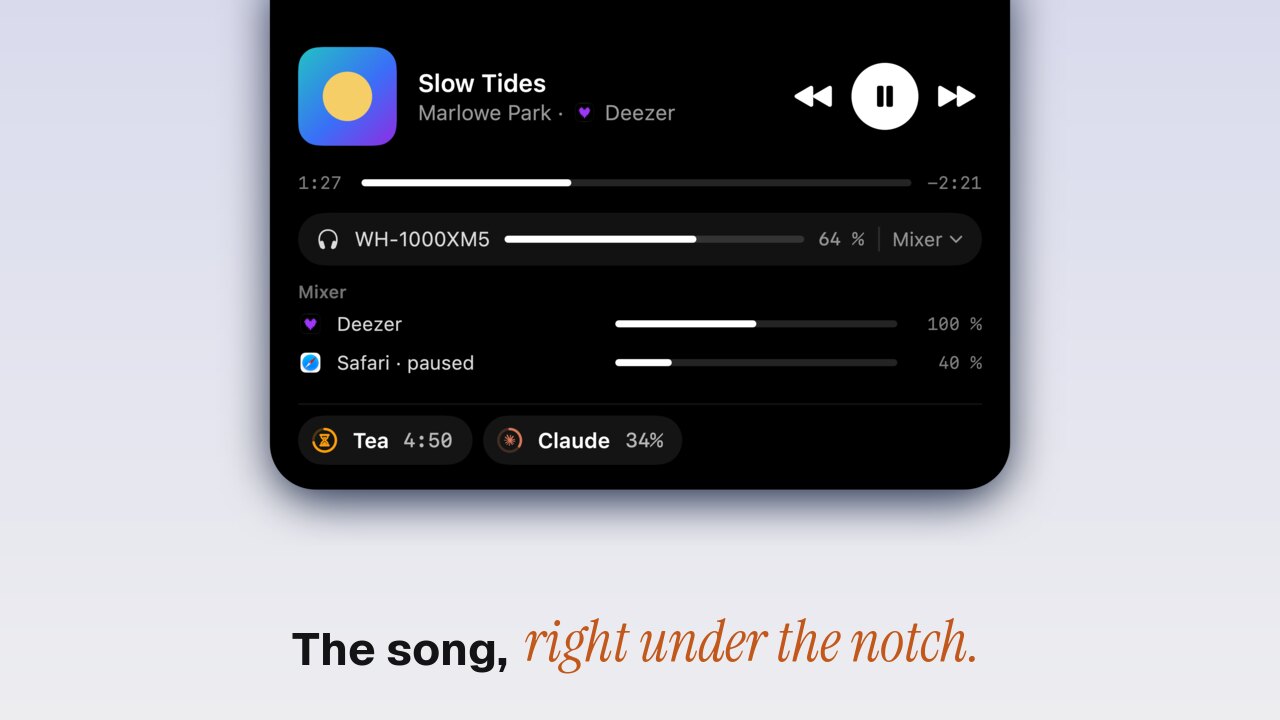
To control the music on a Mac without switching to Spotify or Apple Music, press the play and skip keys on the keyboard (F7 to F9), or open Control Center in the menu bar, where Now Playing shows the song with play, pause and skip. For the song always in view, with artwork, a scrub bar and the volume one hover away, Toolnotch 2 puts it around the MacBook's notch.
Option 1: the media keys
The ⏮ ⏯ ⏭ keys on a Mac keyboard control the last app that played. They're instant and free. Two catches: when a browser tab and Spotify both played recently, the keys sometimes go to the tab, and they don't tell you what's playing.
Option 2: Now Playing in Control Center
Click Control Center at the top right of the screen. Now Playing shows the song, its app, and play, pause and skip; click it for a scrub bar and the output. In System Settings › Control Center, set Now Playing to « Always Show in Menu Bar » to get its own icon.
It's built in and works with every app. It's also two clicks away and hidden while you work: you see the song only when you open it.
Coming from Apple: Now Playing in the menu bar
The first beta of macOS 27.3, out in November 2026, shows Live Activities as pills in the menu bar, Music among them, on Macs with and without the island. macOS 27.3 is expected in December. If you run macOS 27 and only want to see the song, that may be enough.
Option 3: the song in the notch
Toolnotch's live island puts what runs on your Mac around the notch. When music plays, its artwork sits left of the notch and five moving bars right of it, in the artwork's colour. When the song changes, its title peeks out for a moment. Rest the pointer on it and the card opens:
- artwork, title, artist and the app playing it;
- ⏮ ⏯ ⏭ and a scrub bar;
- the output (speakers, AirPods) and its volume, and each app's volume;
- « Switch to » when two players run at once, such as Spotify and a YouTube tab.
Pause the music and the island folds away after 30 seconds. Disconnect your headphones and the music pauses, so the next song doesn't play out loud in the office.
Which apps
Any app that tells macOS what it plays shows up, browsers included. Toolnotch treats Apple Music, Podcasts, Spotify, Deezer, Tidal, Qobuz, Amazon Music, YouTube Music and Pocket Casts as music apps. To keep browsers and video players out of the notch, turn on « Music apps only ».
The bars
By default the five bars beside the notch move on their own. Turn on « Bars to the music » and they follow the real sound; that needs the System Audio Recording permission, asked only when you turn it on.
The media keys
Out of the box, macOS opens Apple Music when you press play with nothing playing. With « Media keys open my player », on by default, the play key starts your own player instead. It needs the Accessibility permission; without it, macOS keeps its usual behaviour.
Which one to pick
| Media keys | Control Center | Toolnotch | |
|---|---|---|---|
| Price | Free | Free | $19.99 at most, once, with the other tools (pricing) |
| See what's playing at a glance | No | No (click first) | Yes |
| Artwork | No | Yes | Yes |
| Scrub bar | No | Yes | Yes |
| Volume per app | No | No | Yes |
| Two players at once | Last one wins | Shows both | « Switch to » |
Limits
- macOS versions. Toolnotch reads what's playing through a part of macOS Apple doesn't document, switched on for macOS 15, 26 and 27. On any other version it falls back to Apple Music and Spotify only, without artwork.
- Full screen. On a Mac without a notch, the island shows only while the menu bar does.
- No lyrics or queue. The card shows the current song, not what comes next.
Setting it up
- Download Toolnotch from toolnotch.app and open it. It runs on macOS 15 Sequoia or later.
- Play a song. It's in the notch.
- Settings › General › Daily Mac › Now Playing holds the options above.
FAQ
How do I show the current song in the Mac menu bar?
System Settings › Control Center › Now Playing › « Always Show in Menu Bar ». For the song beside the notch with its artwork, use an app such as Toolnotch.
Does it work with Spotify's web player or YouTube?
Yes, any browser tab that plays media shows up, unless « Music apps only » is on.
Does it work on a Mac without a notch?
Yes. The island hangs from the middle of the menu bar.